Allen-Bradley 2711P-K6C20D8 PanelView Plus 6 5.7-in. Keypad – Pickup in Store
In stock: 1 unit in Milwaukee, WI. Physically stocked and ready to ship or available for local pickup. Includes a 1-year full-function warranty.
PanelView Plus 6 5.7-in. color keypad terminal · Ethernet + RS-232 · 24V DC powered


Actual NJT inventory photos
Price
$3,599.99USDUsed, Series AView listing
| Part Number | 2711P-K6C20D8 |
| Description | PanelView Plus 6 keypad terminal, 5.7-in. Keypad, 24V DC. In stock in used condition, Series A. |
| Shipping | Ships same or next business day
|
| Pickup | Free local pickup at 2122 N Prospect Ave. Call ahead at (414) 331-5954. |
| Warranty | 1-year full-function warranty provided by NJT Automation. Warranty details
|
| Returns | 90-day free returns. View return policy |
| Exchange | Send us your defective 2711P-K6C20D8 after your purchase for a 10% core credit. We also purchase old or damaged parts outright. |
Replacement Options for 2711P-K6C20D8


| Variants | Part NumberConditionSeriesQtyPrice 2711P-K6C20D8 /A$3,599.99 Used · Series A · 1 in stock2711P-K6C20D8 /AUsedSeries A1$3,599.99 USD | ||||||||
| Availability | 1 unit in stock | ||||||||
| Repairs | 2711P-K6C20D8 Mail-In Repair ServiceEstimated: $1,620.00 | ||||||||
Part Number Decoder | PanelView Plus 6 keypad terminal 2711PK6C20D8
Decoded from the Rockwell Automation catalog-number structure. Series and firmware revision are printed on the product label, not encoded here. | ||||||||
Series & Revisions | Series A in stock; other series on request. Series notes: Same cutout and connections across series; confirm the replacement's firmware supports the project's FactoryTalk View ME version. | ||||||||
Intended Use | Designed for machine operator interface (HMI) applications. PanelView Plus terminals with a 5.7-in. display are the operator screens on packaging, food and beverage, pharmaceutical, automotive and water equipment, running FactoryTalk View ME applications against Logix, SLC and PLC-5 controllers. Keypad models suit gloved operators and washdown areas where a touchscreen is impractical. | ||||||||
Migration Path | Rockwell Automation has discontinued PanelView Plus 6 (400/600, 700 to 1500 and Compact). Published successor for the PanelView Plus 6: PanelView Plus 7 Standard 2711P-T6C21D8S (6.5-in.).
A like-for-like replacement or a repair keeps the existing program, wiring and panel layout; a migration is a project. Both are listed on this page so the choice can be made on lead time and budget. | ||||||||
Physical Data | Weight and DimensionsWeight1.60 lb (0.73 kg)H × W × D6.6 × 10.5 × 2.7 in. (167 × 266 × 68 mm)
Product weight and dimensions are typical manufacturer-published values and may differ by series or option. Shipping box and weight are estimates for freight planning; the packed unit may ship in a different box. | ||||||||
Similar Part Numbers |
| ||||||||
Allen Bradley Information | Technical SpecificationsLifecycle status
| ||||||||
| Category | PanelView Plus | ||||||||
| UPC / GTIN | 00884951344150 | ||||||||
| Part Number | 2711P-K6C20D8 | ||||||||
| Manufacturer | Allen-Bradley | ||||||||
Previously sold 2711P-K6C20D81 sold
NJT Automation has supplied and shipped one 2711P-K6C20D8 PanelView Plus 6 keypad terminal in 2024; these listings are sold and the in-stock options above are ready to ship.
- Sold
- 1 in 2024
- Series
- A × 1

Image gallery27 PHOTOSActual units photographed by NJT
Can the 2711P-K6C20D8 be repaired?
Yes. NJT Automation repairs the 2711P-K6C20D8 by mail-in: diagnostic evaluation, component-level repair and a functional test, backed by a 1-year full-function warranty.
Option 1
NJT managed repair
- Evaluation
- Free. No repair, no charge.
- Shipping
- Prepaid UPS label both ways.
- Pricing
- $650 minimum. Rush service available.
- Warranty
- 1-year full-function warranty included; 2- and 3-year options.
Option 2
Independent repair bids. Compare quotes from independent repair technicians. Post your repair on RepairMode to receive competitive bids from experienced technicians. Each technician sets their own pricing and warranty.
Common Failures
Failure patterns we regularly see on PanelView Plus 6 keypad terminal hardware like the 2711P-K6C20D8:
- Hangs on the splash screen: control board flash or firmware corruption
- No power LED on 24V DC input: failed electrolytic capacitors, input fuse or DC-DC converter on the power supply board
- Backlight dim or dark with the terminal still running: aged CCFL or a failed inverter board
- Keypad overlay cracked or peeling at the high-use keys
- Membrane keypad wear: function keys or numeric keys not responding, or a stuck-key fault at power-up
Fault code reference
2711P-K6C20D8 Fault Codes
19 codes · 2711P-UM006
Fault codes a PanelView Plus 6 keypad terminal reports on the start-up splash screen (shown as Fatal followed by a two-character code, for example Fatal 3A) and the Fault (red) and Comm (green) indicators, as documented in Rockwell Automation publication 2711P-UM006. Use them to narrow a problem down to the unit, its wiring or the application before sending it in for repair.
Fatal start-up codes
| Code | Failure | What it indicates |
|---|---|---|
| Fatal 02 | Watch dog reset | A momentary loss of control due to a software failure. The terminal halts at the maintenance window; monitor for recurrence. |
| Fatal 03 | Failed RAM | POST failure in the terminal's RAM; a hardware fault in the logic module (700…1500) or the terminal's logic board (400/600). |
| Fatal 0F | Firmware update failure | Fatal during firmware loading. Reset from the maintenance menu, restore factory defaults or reinstall firmware. |
| Fatal 1E | Firmware validation (CRC/format) failure | Fatal during firmware loading (1E also appears as a normal 'Update' progress code). Reset, restore defaults or reinstall firmware. |
| Fatal 1F | Firmware compatibility index failure | Firmware failed to validate the compatibility index of a firmware region; reinstall the correct firmware. |
| Fatal 31 | Stuck key | POST found a function key held or stuck. Make sure nothing presses on the keypad and reset the terminal without touching any key; if it persists, the fault is in the keypad / display module. |
| Fatal 3A | Stuck touch | POST found a touch cell held or stuck. Make sure nothing is pressing on the screen (including a damaged anti-glare overlay), then reset without touching it; if it persists, the fault is in the touch screen / display module. |
| Fatal 3B | Failed backlight | POST could not start the backlight; a hardware fault in the display module. If 3A or 3B appears right after an LED-backlit (newer series) display module was fitted to an older logic module, check the logic module firmware first (2711P-IN030 requires 7.00.20 or later for LED displays on Plus 6). |
| Fatal A5 | Firmware write to storage failure | Fatal during firmware loading (A5 also appears as a normal 'Update/Restore' progress code). Reset, restore defaults or reinstall firmware. |
| Fatal D2 | Firmware stored image verification failure | Fatal during firmware loading; reset, restore defaults or reinstall firmware. |
Show 6 more codes
| Fatal FF | Invalid or missing OS firmware image | No valid operating system image (FF also appears as a normal 'AutoTest' progress code). Reinstall firmware. |
| Fatal R0 | Failed to initialize restore operation | Fatal during a restore; reset the terminal from the maintenance menu. |
| Fatal R1 | Invalid header in .pvb file | Fatal during a restore; the backup file header is invalid. |
| Fatal R2 | Invalid header | Fatal during a restore. |
| Fatal R3 | Cannot write intermediate files | Fatal during a restore; the terminal could not write intermediate files. |
| Fatal R4 | Corrupt .pvb file | Fatal during a restore; the backup file is corrupt. |
The splash screen shows the state word and the code together, for example "Fatal 3A". Codes shown with the state AutoTest, Boot, Init, Update or Restore (E6, FF, G0, H1–JA, K1–MA, 1E, A5, DC) are normal progress messages; only codes shown with the state Fatal are errors. Rockwell Knowledgebase 459615 reproduces this list.
Status indicator states if the terminal stops during start-up
| Indicators | State | What it indicates |
|---|---|---|
| Fault blinking · Comm off | Recoverable firmware error | Last firmware download failed. Reload the firmware with the Firmware Upgrade Wizard. |
| Fault on · Comm off | Non-recoverable logic module fault | Hardware fault in the logic module (700…1500) or the terminal's logic board (400/600); not recoverable by a reset or firmware reload. |
| Fault on · Comm blinking | Non-recoverable display module fault | Hardware fault in the display module (700…1500) or the terminal's display section (400/600); not recoverable by a reset or firmware reload. |
Where the manual's only remedy for a code is to replace the unit or module, the code is pointing at a hardware fault inside that part. Those are the faults NJT Automation repairs at component level, so a repair quote is usually the first thing to check before buying a replacement.
Source: Rockwell Automation publication 2711P-UM006, PanelView Plus 6 Terminals User Manual. Codes are listed as documented; fault behaviour can vary by firmware revision, so confirm against the manual for your unit's series.
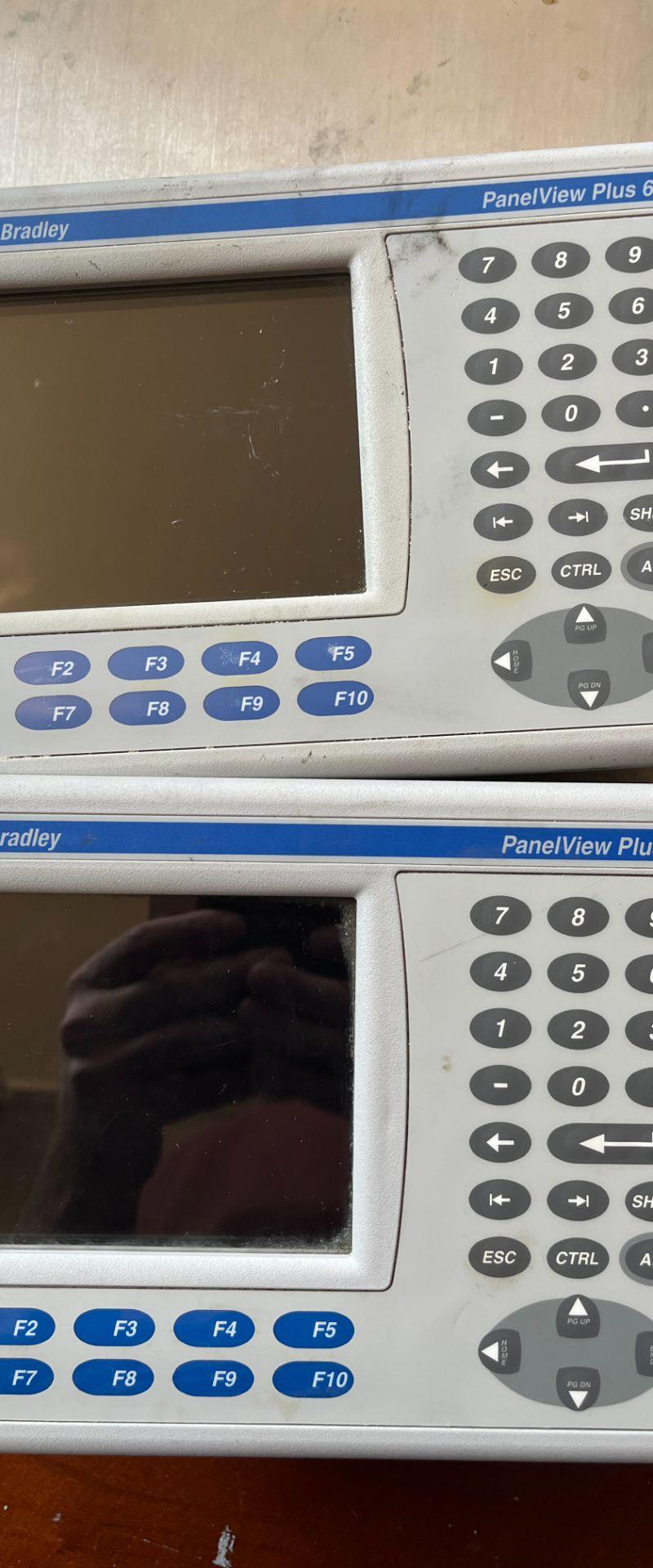
Photos by NJT Automation; test videos from NJT or network repair technicians.
Still have questions?
Find answers to shipping, warranties, repairs, and more.